Advanced Array
Advanced Array creates copies where each successive copy has a compounding transformation applied – an offset, rotation, and scale change that builds on the previous copy. This creates spirals, staircases, shrinking sequences, and other progressive patterns.
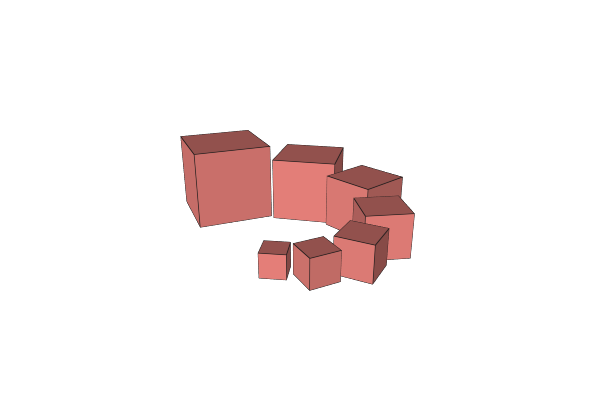
How to Use
- Select an object
- Apply the Advanced Array operation from the Array menu
- Adjust the offset, rotation, and scale applied at each step
Parameters
- Count - Number of copies (default: 3)
- Offset - Translation applied to each copy relative to the previous one (default: 30mm along X)
- Rotate - Rotation angle in degrees applied to each copy (default: -15 degrees). Supports expressions.
- Rotate Part - Whether the geometry rotates or only the position changes (default: on)
- Scale - Scale multiplier applied at each step (default: 0.9, meaning each copy is 90% the size of the previous one). Supports expressions.
- Scale Offset - If enabled, the offset distance is also scaled at each step (default: on). This creates tightening spirals when scaling down.
How Compounding Works
Each copy builds on the transformation of the previous one:
- Copy 1: original position
- Copy 2: offset + rotation + scale applied once
- Copy 3: offset + rotation + scale applied twice (compounded)
- And so on…
When Scale Offset is on, the offset shrinks (or grows) with each step, creating spiral or converging patterns.
Tips
- Set Scale to 1.0 for uniform-size copies with only position and rotation changes
- Set Rotate to 0 for stacked/stepped patterns without rotation
- A 90-degree rotation with vertical offset creates a spiral staircase
- Scale values less than 1.0 create shrinking sequences; greater than 1.0 create growing sequences
Related
- Linear Array - Simple straight-line duplication
- Radial Array - Simple circular duplication