Braille
Braille turns English text into raised Braille dots on a backing plate. It can write letter-by-letter (Grade 1) or contracted (Grade 2) Braille. The dots are always the standard Braille size, so the result can be read by touch.
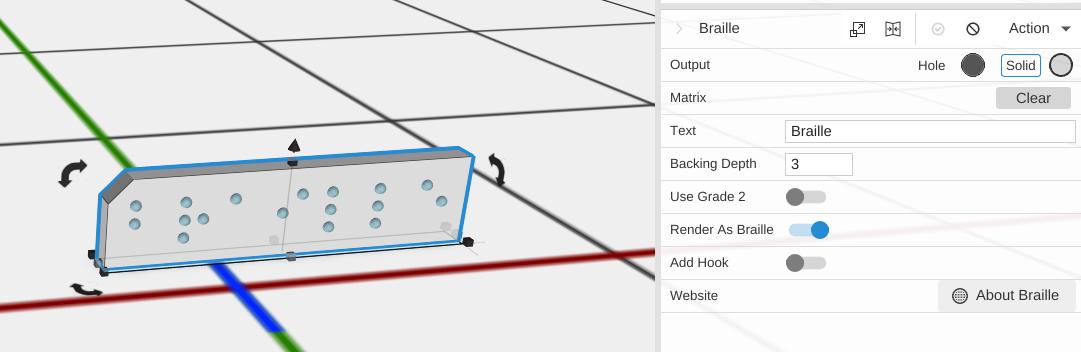
How to Use
- Open Included > Design Apps in the Library (or under Add to Bed) and add Braille to the bed
- Type your words in the Text box in the Properties panel
- The dots update to spell it in Braille
Parameters
- Text - The English text to write in Braille (default “Braille”)
- Backing Depth - How thick the plate under the Braille dots is, in mm (default 3; the slider runs 0.5 to 10)
- Use Grade 2 - Off by default. Turn it on for Grade 2 Braille, which uses contractions for common words and letter groups
- Render As Braille - On by default. Turn it off to show the same text in ordinary letters instead of dots, which helps you see what Grade 2 changed
- Add Hook - Off by default. Adds a loop so the plate can hang from a necklace or keychain
- Website - Opens the Wikipedia page about Braille
Tips
- Grade 2 Braille is more compact, because it writes common words and letter combinations as single cells
- The dot size and spacing follow the Braille standard and cannot be changed, so the result stays readable. Scaling the object changes the dots too, so leave it at full size if it is meant to be read
- For a single letter shown both in Braille and as an ordinary letter, see Braille Card
Related
- Braille Card - One letter in Braille with the ordinary letter above it
- Text - Standard 3D text