Expressions
Most parameters in MatterCAD accept an expression instead of a plain number. An expression is a small formula that MatterCAD evaluates every time something it depends on changes, which is what makes a design parametric: change one value and every dimension derived from it follows.
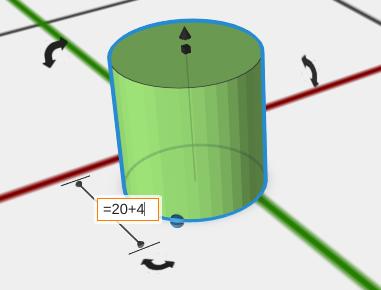
This page describes the expression language itself. See Expression Functions for the function library, Object References for reading another object’s settings, Variable Sheet for storing shared values a whole design can use, and Modify Parameters for driving an object’s visibility and colour from an expression.
Starting an Expression
Type = as the first character of the field. Everything after the = is treated as a formula:
=20 + 5evaluates to25=pi * 10evaluates to31.415926535897931=wall_thickness * 2reads a value from the Variable Sheet
Without the leading =, the field keeps what you typed - 20 + 5 in a numeric field is just an unparsed entry, and in a text field it is the literal text.
The same rule applies inside Variable Sheet cells: a cell whose contents start with = is a formula, and anything else is stored as a plain number or as text.
Autocomplete
You do not have to remember every name. Once a field starts with =, MatterCAD offers a list of what you can type at the cursor:
- Start typing a word - the list shows the sheet cell names, functions, objects and
selfthat begin with what you typed. Typing=on its own, or after an operator or(, shows nothing until you type a letter. - Type
[- the list shows every bracket name that works in this field.[index]appears only inside an Array, and in the colour fields of Modify Parameters[red],[green]and[blue]come first. - Type an object’s name and a dot, or
self.- the list shows that object’s settings with their current values, ready to reference. After a setting such as a position, another dot lists its X, Y and Z.
Each row shows the name and, where there is one, its current value. The line at the bottom of the list says what the highlighted entry is.
| Key | What it does |
|---|---|
| Up, Down, Page Up, Page Down | Move the highlight |
| Enter or Tab | Put the highlighted entry into the field |
| Esc | Close the list and keep what you typed |
| Click | Put the clicked entry into the field |
Picking a function types its name and the opening (, ready for its arguments. Picking an object types its name and the dot, so the list of its settings opens straight away.
Autocomplete works in every expression field: the Properties panel, the number boxes in a node graph, the X and Y boxes of the path editor, and the formula bar and cells of a Variable Sheet.
Numbers in Your Region’s Format
Numbers are shown and typed the way your computer’s region writes them. Where a comma is the decimal mark, formulas use it too, and a semicolon separates function arguments and the parts of a vector, the way spreadsheets do: =MAX(1,5; 2) and [1,5; 2; 3]. Elsewhere the same formulas read =MAX(1.5, 2) and [1.5, 2, 3]. You can always type a period as the decimal mark.
Type numbers without thousands separators - 1000, not 1.000 or 1,000 - or MatterCAD will ask you to.
Your design is saved the same way whichever format you use, so it opens identically on any computer. To choose a format other than your region’s, set Number format in Application Settings to 1234.5 or 1234,5.
Operators
| Operator | Meaning |
|---|---|
+ | Addition. If either side is text, the two sides are joined instead |
- | Subtraction, and negation as in =-A1 |
* | Multiplication |
/ | Division. Dividing by zero produces NaN |
( ) | Grouping |
< <= > >= | Comparison. The result is 1 for true and 0 for false |
== != | Equal and not equal. Numbers compare as numbers, text compares as text |
Comparisons are what drive checkbox-style parameters and switch one value in for another:
=hole_count > 4gives1or0=(diameter > 20) * 3 + 2gives5when the diameter is over 20 and2otherwise
Subtracting text is not meaningful, so ="a" - 1 produces NaN rather than a value.
Constants
Three math constants can be used by name anywhere in a formula:
pi- 3.14159…, the ratio of a circle’s circumference to its diametertau- 6.28318…, a full revolution in radianse- 2.71828…, the base of the natural logarithm
[pi], [tau] and [e] work in square brackets too, so you can write either style.
Units
Expressions - and the model itself - are always in millimetres. A number with no unit on it is a number of millimetres, no matter which units the workspace is displaying. Write a unit when you want something else converted for you:
| Unit | Value in mm |
|---|---|
mm | 1 |
cm | 10 |
m | 1000 |
in, inch | 25.4 |
ft | 304.8 |
=1.5ingives38.1=0.25 in + width/2adds a quarter inch to half ofwidth
A unit can be written straight onto a number (=3mm, =1.5 in) or used as a value of its own (=2 * in is the same 50.8 as =2in). The bracket form =2 * [inch] still works as well.
A unit written on a number belongs to that number alone, exactly the way a decimal point does: 2in is the single value 50.8, so =1/2in is one divided by two inches, not half an inch. Half an inch is =0.5in or =1/2*in.
A field that does not start with = accepts a unit too: type 1.5in into a length box and you get 38.1 mm whether the box is showing inches or millimetres. A plain number there is still read in whatever units the box displays.
If a Variable Sheet cell is named after a unit, the cell wins - your own value is used, not the built-in one.
Referencing Sheet Values
When a Variable Sheet is in the design, its cells become names your expressions can use. Every cell can be referenced two ways:
- By address -
=A1,=B12. Addresses are the familiar spreadsheet A1 style: column letters then a one-based row number, and they are not case sensitive (=a1and=A1are the same cell). - By name -
=wall_thickness, if you gave the cell that name in the sheet’s Name box.
Names are usually the better choice because they say what the value means and they survive rows and columns being added. Addresses are useful when a formula has to walk a table - see index() and xlookup() in Expression Functions.
Objects find the nearest Variable Sheet above them in the scene tree, so a sheet inside a group only serves that group.
Bracket Tokens
A few values are not part of the formula’s arithmetic - they are substituted into the text of the formula before it is evaluated, which is why they are written in square brackets.
| Token | Meaning |
|---|---|
[index] | The position of this copy inside the enclosing Array, counting from 0 |
[index0] | The same as [index] |
[index1] | The position inside the next Array out, for arrays nested inside arrays |
[index2] | The position inside the Array one further out again |
[rand] | A new random number between 0 and 1 each time the expression is evaluated |
Because the substitution happens first, an arrayed copy sees its own position as a literal number - the fifth copy evaluates =[index] * 12 as =4 * 12. That is what lets an array of copies each read a different row out of a sheet:
=index("A", [index]+2)
The +2 skips the header row and converts the 0-based copy position into the 1-based row number index() expects, so the first copy reads A2, the second reads A3, and so on. Give a Text object that expression as its text and an array of it becomes a run of parts, each labelled from its own row.
[index] only means something for an object inside an Array. In a sheet cell there is no array copy to ask about, so use it in the object’s own parameter fields.
Text Values
Text in a formula goes in double quotes, and the usual escape sequences work inside those quotes: \n for a newline, \t for a tab, \\ for a backslash and \" for a quote character.
=strcat("Part ", A1)joins a label to a cell value="Serial " + B2does the same thing with+, since one side is text
A cell holding text is text everywhere it is used, so a text cell fed into a numeric field will not produce a number.
Object Property References
An expression can read a setting off another object in the scene by name:
=Handle.Sides- the Sides value of the nearest object named Handle=self.Depth- this object’s own Depth='Handle Cuts'.Sides- a name with spaces, in single quotes
Editing the referenced value rebuilds everything that follows it, the same way a sheet edit does. See Object References for how names are resolved and which properties can be read.
When an Expression Cannot Be Resolved
MatterCAD never guesses at a value it could not work out:
- A misspelled cell name or address, or a reference to a cell that does not exist, resolves as unknown. In the sheet the cell shows
0; in an object parameter the field falls back to a placeholder value (0.1for a decimal field,1for a whole-number field), which is a strong hint that the reference is wrong. - Cells that depend on each other in a loop also resolve to
0rather than looping forever. - A formula that cannot be parsed at all is kept as the text you typed, so nothing is lost and you can correct it in place.
Formulas the AI Writes
When the AI writes a formula into a number, whole-number or X, Y and Z setting, MatterCAD checks it first. If the formula names a cell, object or setting that isn’t there, or isn’t a complete formula (such as =W*), the change is refused: nothing in your design changes, and the AI is told what is wrong and which names exist, so it can fix the formula. A formula that is written correctly but can’t get its value for another reason, such as a missing wire in a node graph, is kept and shows the panel’s usual warning, the same as one you type.
Tips
- Expressions work in any parameter the properties panel shows a value box for - dimensions, counts, angles, offsets and text.
- Build relationships instead of repeating numbers: set a hole’s diameter to
=outer_diameter - 4so it always leaves 2 mm walls. - Use a Variable Sheet when more than one object needs the same value.
- Expressions re-evaluate on their own when anything they reference changes - there is nothing to refresh by hand.
Related
- Expression Functions - Every function you can call, with examples
- Object References - Read another object’s settings with
Name.Propertyandself.Property - Variable Sheet - Store shared values and formulas for a design
- Components - Create reusable parameterized designs
- Array - Repeat an object and drive each copy from
[index] - Editing Objects - Working with object parameters