Select Paths
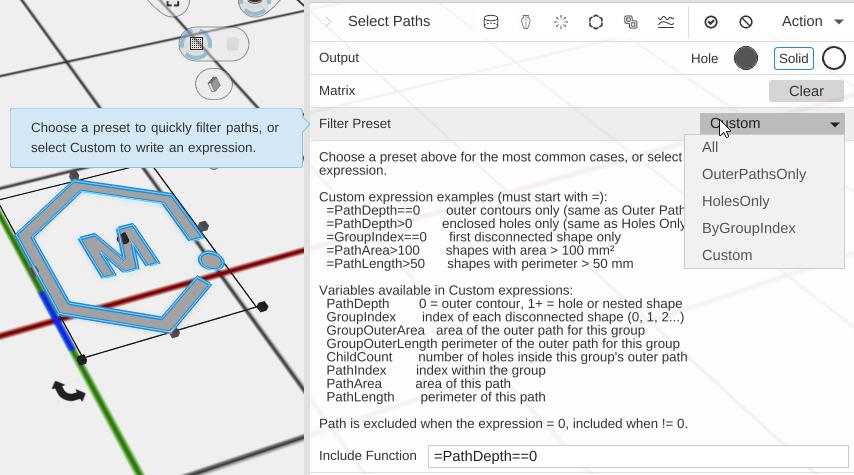
Select Paths filters which sub-paths from a complex path object are kept. It is especially useful when working with decorative or multi-part fonts where you need the outer letterforms and inner cutout shapes as separate pieces — for example, to give them two different colors.
How to Use
- Select a 2D path (or a Text object with its Output set to 2D)
- Click Select Paths in the Path group of the toolbar
- Pick a Filter Preset
Parameters
- Filter Preset - Which paths to keep: All (default), Outer Paths Only, Holes Only, By Group Index or Custom (see below)
- Group Index Filter - The shape group to keep, counting from 0 (default 0). Shown only for By Group Index
- Include Function - The expression that decides each path (default
=PathDepth==0). Shown only for Custom
How Path Depth Works
When a path object contains shapes with enclosed areas (like the inside of the letter “O”, or the hollow of a decorative swirl), those enclosed areas are holes at depth 1. The outer contour of each letter or shape is at depth 0.
Depth 0 — outer contour of each letter or shape
Depth 1 — first level of enclosed holes (inside an "O", "A", etc.)
Depth 2 — shapes nested inside a hole (rarely used)
Filter Presets
All
Includes every path unchanged. This is the default and equivalent to not applying Select Paths at all.
Outer Paths Only
Keeps only the outer contour of each shape (depth == 0). Use this to get just the letter outlines from a decorative font, without the inner cutout areas.
Holes Only
Keeps only the enclosed holes (depth > 0). Use this to get just the inner cut areas of letters and shapes.
By Group Index
Keeps only paths belonging to one disconnected shape. Group 0 is the first shape, group 1 is the second, and so on. Use this to isolate a single character from a word.
Custom
Write an expression that is evaluated for each path. The path is included when the expression is non-zero and excluded when it is zero.
Expressions must start with = to enable variable substitution. Without =, the value is treated as a plain number (e.g., 1 always includes, 0 always excludes).
Custom Expression Examples
| Expression | Effect |
|---|---|
=PathDepth==0 | Outer contours only (same as Outer Paths Only) |
=PathDepth>0 | Holes only (same as Holes Only) |
=GroupIndex==0 | First disconnected shape only |
=PathArea>100 | Shapes with area larger than 100 mm² |
=PathLength>50 | Shapes with perimeter longer than 50 mm |
Custom Expression Variables
| Variable | Meaning |
|---|---|
PathDepth | 0 = outer contour; 1+ = hole or nested shape |
GroupIndex | Index of the disconnected shape (0, 1, 2…) |
GroupOuterArea | Area of the outer path for this group |
GroupOuterLength | Perimeter of the outer path for this group |
ChildCount | Number of holes inside this group’s outer path |
PathIndex | Sequential index of this path within its group |
PathArea | Area of this individual path |
PathLength | Perimeter of this individual path |
Example: Two-Color Lettering
A common use for Select Paths is decorative text where the letters have inner cutout shapes. To give the outer letters one color and the inner cuts a second color:
- Add a Text object and set it to 2D output
- Apply Select Paths → set preset to Outer Paths Only
- Apply Linear Extrude to give it height → give it your first color
- Go back to the original text object
- Apply a second Select Paths → set preset to Holes Only
- Apply Linear Extrude with the same height → give it your second color
- Position one extruded object on top of the other — the two colors align perfectly
Related
- Linear Extrude — Give the filtered paths height to create a 3D object
- Revolve — Spin filtered paths around an axis
- SVG Object — Import vector paths that may contain multiple sub-paths
- Text — Text objects in 2D mode produce multi-path output