Image Object
An Image is a picture placed in your design. MatterCAD builds it as a very thin flat slab – 0.2mm thick – with the picture painted on its upward face, sized so the image’s longer side is 60mm and its proportions are kept. Nothing in the picture becomes height: brightness is not depth here, and an Image on its own is a flat photograph lying on the bed, not a relief.
What makes it useful is what reads from it. Every image operation – Image Converter, Image to Path and Lithophane – takes an Image as its input, and each is only enabled when the selected item is one. On its own an Image is also a good tracing reference or a label you can see while you build around it.
How to Use
There are three ways an Image gets into a design:
- Drop a file on the bed. Drag a
png,jpg,gif,webportgafile from your desktop onto the 3D view. It arrives as an Image named “Image” - Insert from the library. Image files stored in your library open the same way
- From inside an Image Converter. The Image Converter in the 3D Primitives folder is a component built around an Image. Expand it in the design tree to select the Image inside it and change the picture there
Once it is in the scene:
- Move, rotate and scale it as usual. The corner handles scale it in X and Y and it rotates about Z; there is no Z scale handle, because the slab’s 0.2mm thickness is not a design parameter
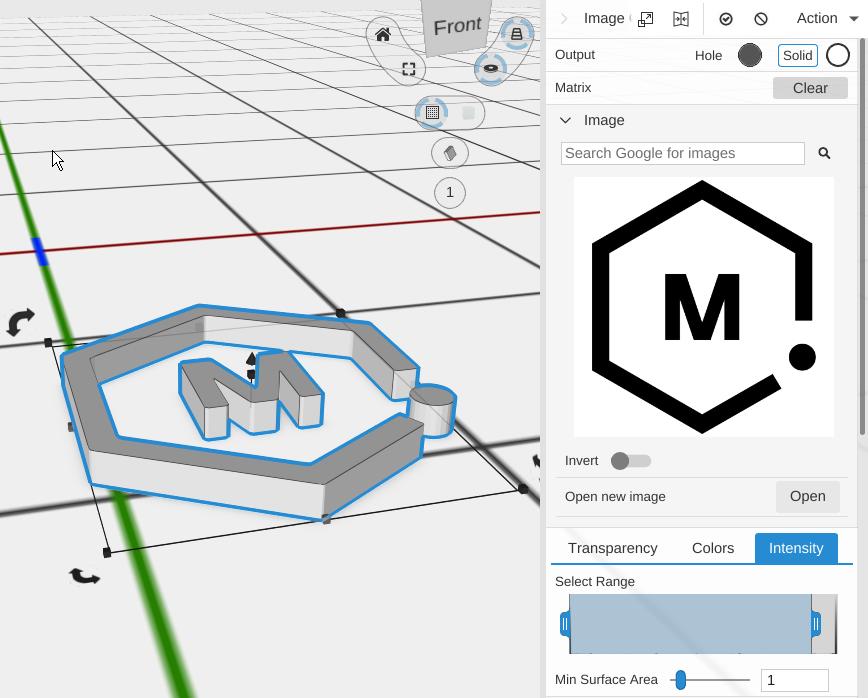
- Click the thumbnail in the Properties panel to pick a different picture, or right-click it for Open, Copy and Paste
- Choose an image operation from the Image group of the toolbar to turn the picture into geometry
Parameters
Size
There are no size fields. The slab is derived from the picture: the longer side of the image becomes 60mm, the shorter side follows the image’s aspect ratio, and the thickness is always 0.2mm. To get a specific size, scale the object in X and Y like any other part.
The pixels-to-millimetres scale that produces this is also what the operations downstream use to convert what they measure in the picture into millimetres, which is why a traced shape comes out the same size as the image it was traced from.
The picture
- Image Search - Searches Google for an image to use. Make sure you have permission to use anything you find
- The thumbnail - Left-click it to open a file. Right-click it for a menu with Open, Copy (puts the current picture on the clipboard) and Paste (saves the clipboard picture into your library and uses it). Replacing the picture this way is undoable
- Open new image - The same file dialog as clicking the thumbnail. It accepts
jpg,png,bmp,gif,webpandtga - Invert - Flips the picture’s lightness, so light areas become dark and dark areas become light. This changes which parts of the picture an Intensity trace picks up, so it is usually easier to invert here than to fight the histogram in Image to Path
If a picture cannot be found or read, the object shows an “Image Missing” placeholder rather than disappearing, so the operations built on it stay intact until you point it at a file again.
Colour and material are not offered for an Image – the picture supplies its own colours – and there is no Apply, because there is nothing to flatten into a mesh.
Tips
- Brightness into height is Lithophane. That is the height-map tool. The Image itself never turns light and dark into thickness
- A solid silhouette is Image Converter, which traces the picture and extrudes the outline, with an optional base under it
- Just the outline as a 2D path is Image to Path, ready for your own extrude, revolve or offset
- Swap the picture on an existing Image rather than deleting it and adding a new one. Everything stacked above it re-traces from the new picture and keeps its own settings
- An Image is not a solid. Boolean operations skip it, so combine the result of an image operation with a Cube or another part, not the Image itself
- A QR Code counts as an image too, so the same three operations are available on one
- When you save, the picture is copied into the design’s assets, so the design keeps working even if you move or delete the original file
Related
- Image Converter - Trace the picture and extrude it into a solid part
- Image to Path - Trace the picture into 2D paths
- Lithophane - Turn brightness into thickness for a backlit panel
- QR Code - Another object the image operations accept as input
- SVG Object - Import vector graphics instead of a raster picture
- Components - How the Image Converter wraps an Image and surfaces a chosen set of controls