Components
A component is a group of objects that shows only a chosen handful of controls. Everything inside it is still there in the design tree, but the Properties panel presents just the settings that matter – the height of one extrude, the diameter of one hole – so the component reads as a single part with a few parameters rather than as the stack of operations it is built from. The Image Converter is a component MatterCAD builds for you, and the Design Apps are components too.
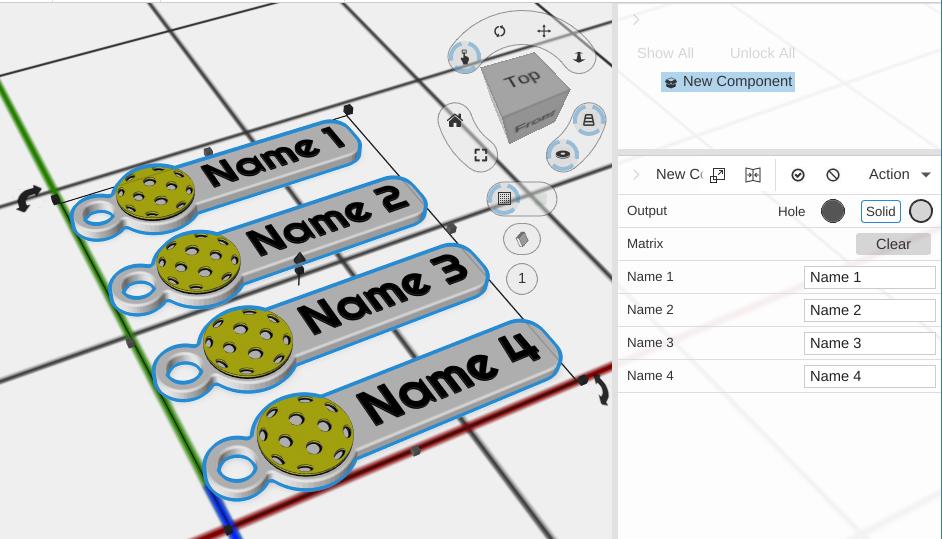
How to Use
Creating a Component
- Select one or more objects at the top level of the scene
- Choose Make Component from the object’s right-click Modify menu, or click it in the Constraints group of the toolbar
- The selection is replaced by a component named “New Component”, which starts in editing mode so you can choose what it surfaces
Make Component is only enabled for a selection sitting at the top of the scene, not for something already nested inside another object.
If you have hidden the Constraints group the toolbar button lives in, click Tools at the right end of the toolbar and set Constraints to Expand or Collapse to bring it back. The right-click Modify menu offers Make Component either way.
Editing and Finalizing
A component has two modes, switched by the Finalized setting:
- Editing (Finalized off) - Everything inside is on show in the design tree, including any Variable Sheet it holds, so you can build and wire it up. The Properties panel shows the component’s Finalized and Surfaced Editors settings
- Distribution (Finalized on) - Only the surfaced controls are shown, and the embedded sheet is hidden. This is how someone using your component sees it
Edit Component puts a finalized component back into editing mode. It is offered in the Modify menu for a finalized component sitting at the top level of the scene.
Choosing What a Component Shows
The Surfaced Editors list decides which settings of the parts inside appear on the component. Each entry in the list shows one setting of one part, or all of one part’s settings.
- Select the component. If it is finalized, choose Edit Component from the right-click Modify menu first
- In the Properties panel, click the add button (a plus sign in a circle) at the end of the Surfaced Editors list. An entry called New Entry appears in the list
- Click the entry’s Edit button. The Editor Selector window opens
- In the tree, click the part whose setting you want to show
- Under Properties, click the setting, for example Width. Click All instead to show every setting of that part, in a section titled with the part’s name
- Click Save. The box at the top of the window shows what the entry will say, such as
"Arm".Width, and the entry takes that text - Add an entry for each setting you want, then turn on Finalized
The surfaced settings appear in the Properties panel once Finalized is on. While you are editing the component, the panel shows the Surfaced Editors list instead. To take a setting off the component, click its entry’s Delete button while you are editing the component. An entry that no longer finds anything, for example after you delete the part it named, shows no row.
To show a cell of the component’s Variable Sheet instead of a part’s setting, type ! and the cell’s name or address in the box at the top of the Editor Selector, for example !wall_thickness or !B2, and click Save. The row is labelled with the cell’s name.
Name Your Parts
An entry finds its part by name, going down from the component, and names that differ only in capital letters count as the same. If two parts on the way share a name, the entry finds the first of them, so the row can show the wrong part; a part with no name is found by its kind, so two unnamed groups side by side have the same problem. Before you surface a setting, give the part, and each group it sits in, a name of its own in the design tree.
Asking the AI
You can ask the AI to do this for you, for example “show the cube’s Depth on the component”. It adds the entry to Surfaced Editors, and the row shows once the component is finalized. If the entry would show nothing, or the way to the part is ambiguous because two parts share a name or unnamed groups sit on the way, the change is refused and the AI is told why, so it can rename the parts or ask you. Naming your parts avoids this.
Example: Parts That Follow Each Other
This component has one setting, Width. Changing it makes one cube wider and moves a second cube along with it.
- Add a Cube and rename it
Armin the design tree - Add a second Cube. With it selected, click Translate in the Transform group of the toolbar
- In the Translate’s X box, type
=Arm.Widthand press Enter. The second cube moves along X by Arm’s width - Select both Arm and the Translate, and choose Make Component
- With the new component selected, add an entry to Surfaced Editors: in the Editor Selector, click Arm, then Width, then Save
- Turn on Finalized
The component now shows a Width row. Change it and Arm grows while the second cube moves with it, because its Translate reads Arm’s Width. See Object References for the settings a formula can read.
Using a Component
- Select the component
- The surfaced parameters appear in the Properties panel
- Change them to change the part
Behind the scenes those parameters usually write into a Variable Sheet inside the component, and the objects in the component read their dimensions back out of it – which is what makes one control move several things at once.
Tips
- Components are useful for creating reusable building blocks in complex designs
- Parameter changes are non-destructive and can be adjusted at any time
- Surface as few controls as you can. A component with four meaningful settings is far easier to use than one with forty
- Copy a component and the copy is independent. Editing one does not change the other – for parts that must stay identical, drive them from one Variable Sheet instead
- Give the parts inside a component names of their own, so each surfaced setting finds the part you meant
Related
- Grouping - Simple grouping without parameterization
- Node Graphs - Wire parts into a reusable tool with a few settings
- Expressions - Use expressions to link component parameters
- Variable Sheet - Store the shared values a component’s parameters read
- Object References - Link a parameter to another object’s setting
- Design Apps - Pre-built components you can customize