Ring Path
A 2D ring shape – a circle with a circular hole in the center – added as Ring from the 2D Primitives. Use with Linear Extrude to create tube or washer shapes.
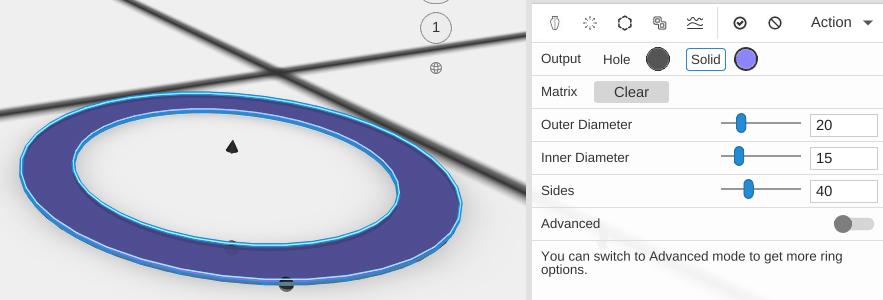
Parameters
- Plane - The construction plane the ring is drawn on (default XY, flat on the bed)
- Outer Diameter - The outer diameter of the ring, in mm (default 20)
- Inner Diameter - The diameter of the hole in the center, in mm (default 15)
- Sides - How many straight segments make each circle (default 40; 3 to 360)
- Advanced - Off by default. Turn it on for Starting Angle and Ending Angle
- Starting Angle - Where the ring begins around its center, in degrees (default 0). Shown only with Advanced on
- Ending Angle - Where the ring ends, in degrees (default 360). Less than 360 leaves a gap, like a C shape. Shown only with Advanced on
Tips
- The wall thickness of the ring is (Outer Diameter - Inner Diameter) / 2
- Extruding a Ring Path creates a tube like the Tube primitive
Related
- Circle Path - A solid circle (no hole)
- Tube - A ready-made 3D tube shape
- Linear Extrude - Give paths height