Creating New Objects
Most designs start from simple shapes. You add them, size them, place them, and then combine or reshape them with operations.
Start a New Design
Click the + button in the row of tabs (Create New Design), or press Ctrl+T (⌘T on Mac) while a design is showing. The new design opens in its own tab with an empty bed.
Add Shapes
Double-click a shape in the favorites bar down the left side of the design, or drag it onto the bed where you want it. (A single click only highlights it.) The bar starts with every 3D primitive except 3D Curve; in the library, the heart on an item adds it to the bar or takes it off.
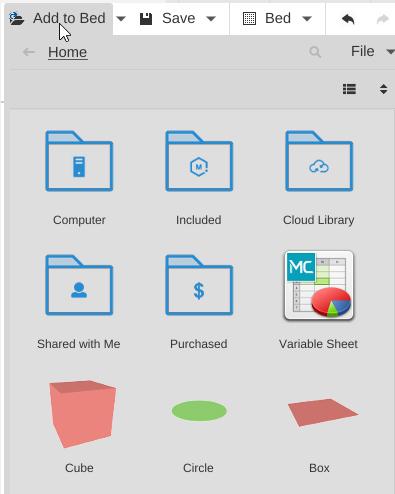
For more shapes, click Add to Bed in the toolbar and open Included:
- 3D Primitives - Cube, Hole, Pyramid, Wedge, Half Wedge, Text, Cylinder, Cone, Half Cylinder, Torus, Tube, Sphere, Half Sphere, Image Converter and 3D Curve
- 2D Primitives - Flat shapes (paths) you can turn into solids with the Path group’s Linear Extrude or Revolve
- Mechanical - Involute Gear, Cycloidal Gear, Threads and Screw
- Tools - QR Code, Measure Tool, Description and Variable Sheet
- Sample Parts - Finished designs to start from
Drag a shape onto the bed, or right-click it and choose Add to Bed.
Each shape has settings you change in the Properties panel once it is selected. A Cube, for example, has Width, Depth and Height. See Primitives for every shape.
The Toolbar

After Add to Bed, Save and Bed, the toolbar holds, in this order:
- Undo / Redo - Take back a change or put it back: Ctrl+Z (⌘Z on Mac) and Ctrl+Y (⌘Y on Mac)
- Arrange All Parts - Arrange all the parts around the middle of the bed
- Lay Flat - Turn the selected part so its lowest face lies flat on the bed
- Rebuild
- Group / Ungroup - Join the selected parts into a group that moves as one, or split a group apart
- Convert to Nodes - Turn the selection into a node graph
- Duplicate / Remove - Make a copy of the selected parts, or delete them. Ctrl+C, Ctrl+X and Ctrl+V (⌘C, ⌘X and ⌘V on Mac) copy, cut and paste
Then the operation groups:
- Transform - Translate, Rotate, Scale and Mirror
- Placement - Align, Align in Place, Fit to Bounds and Bounds (Placement)
- Round & Offset - Fillet, Chamfer, Round All Edges, Round Inside Edges, Dilate, Erode and Hollow Out (Reshape)
- Deform - Curve, Pinch, Radial Pinch, Twist, Plane Cut and Slice to Path (Reshape)
- Image - Image Converter, Image to Path and Lithophane
- Path - Linear Extrude and Revolve turn a flat 2D shape into a solid; also Sweep, Loft, Smooth Path, Inflate Path, Outline Path, Border Path and Select Paths (Path)
- Merge - Combine, Subtract, Intersect and Subtract & Replace
- Duplication - Clone, Array (rows, rings and other patterns of copies) and Select Child
- Mesh - Repair and Reduce
- Constraints - Modify Parameters, Make Component and Edit Component (Components)
- Tools - At the end of the toolbar: collapse or hide groups you don’t use
Hover over a button to see its name. A button that is greyed out tells you, when you hover over it, what to select first.
Building a Shape from Simple Parts
- Add the shapes you need.
- Place them so they overlap where you want them joined or cut.
- Select the parts (click one, then Shift-click the others).
- Apply a Merge operation: Combine joins them; Subtract cuts every part you selected after the first out of the first one.
- Refine with the Round & Offset and Deform groups (Reshape) to round edges, bend or twist.
An operation keeps the parts it was made from, so you can go back and change them later.
Related
- Primitives - Every shape and its settings
- Adding Existing Objects - Bring in files instead of starting from scratch
- Boolean Operations - Combine shapes into more complex ones
- Editing Objects - Move, turn and resize parts