Linear Extrude
Linear Extrude gives a 2D path height, turning a flat shape into a 3D solid. This is the primary way to convert paths into 3D objects.
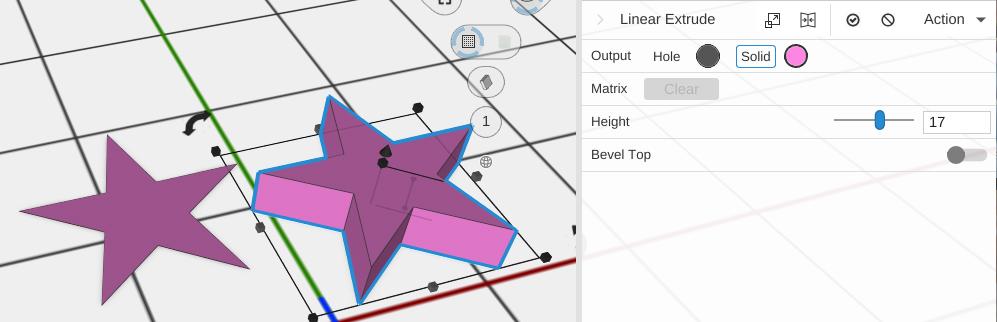
How to Use
- Select a 2D path or path-based object
- Click Linear Extrude in the Path group of the toolbar
- Set the desired height
Parameters
- Height - How tall the extrusion is, in mm (default 5; the slider runs 0.1 to 50)
- Bevel Top - Off by default. Rounds the top edge of the extrusion
- Bevel Bottom - Off by default. Rounds the bottom edge, where the part meets the bed. It has its own size, so a part can have a large round at the bottom and a small one on top
Bevel Parameters
Shown when Bevel Top is on:
- Style - How the corners of the shape are drawn as the edge rounds in: Flat, Round or Sharp (default)
- Radius - How far the round reaches, in mm (default 3; the slider runs 0 to 20)
- Segments - How many steps make the round (default 9; 1 to 20). More is smoother
Shown when Bevel Bottom is on: Bottom Style, Bottom Radius and Bottom Segments, the same settings for the bottom edge (defaults Sharp, 3 and 9).
Projection Plane
Every path operation carries a Projection Plane section that says which flat surface its input paths are flattened onto – by default the plane the first input was drawn on. Leave it on Auto unless the panel warns that your paths are not coplanar. See Construction Planes.
Tips
- This works with any 2D path: Circle, Box, Star, SVG, and Custom paths
- Enable Bevel Top for a more polished, professional look
- For revolving a path around an axis instead of extruding straight up, see Revolve
- For a profile that follows a route through space, see Sweep; for one that changes shape as it rises, see Loft