Cylinder
A round column shape with configurable diameter, height, and number of sides. The Cylinder is essential for creating pins, rods, holes, and round features.
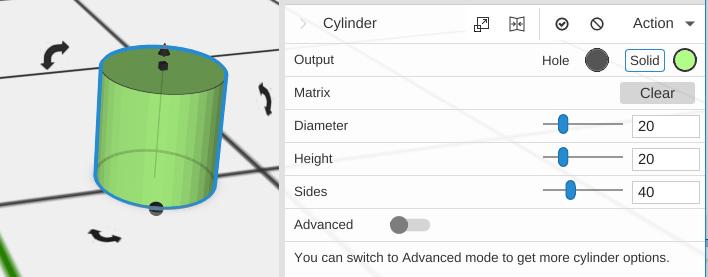
Parameters
- Diameter - The width from one side to the opposite side, in mm (default 20)
- Height - How tall the cylinder is, in mm (default 20)
- Sides - Number of segments around the perimeter (default 40; 3 to 360). Lower values create polygonal shapes (e.g., 6 for a hexagon)
- Advanced - Off by default. Turn it on for the options below
Advanced Parameters
- Diameter Top - The diameter of the top, in mm (default 20). It is separate from Diameter, so changing Diameter leaves it alone; set it differently for a tapered shape
- Starting Angle - Where the cylinder begins around its axis, in degrees (default 0; 0 to 359). Use with Ending Angle to create partial cylinders
- Ending Angle - Where the cylinder ends, in degrees (default 360). Less than 360 makes a pie-slice shape
Tips
- Set Sides to a low number to create regular polygons – 6 for hexagons, 8 for octagons, etc.
- Use different Diameter and Diameter Top values to create truncated cones and tapered shapes
- Set Starting and Ending Angles to create pie-slice or arc shapes
- For a round hole, set a Cylinder’s Output to Hole, or cut it out with Subtract
Related
- Cone - A cylinder that tapers to a point
- Half Cylinder - A cylinder cut in half lengthwise
- Tube - A hollow cylinder