Border Path
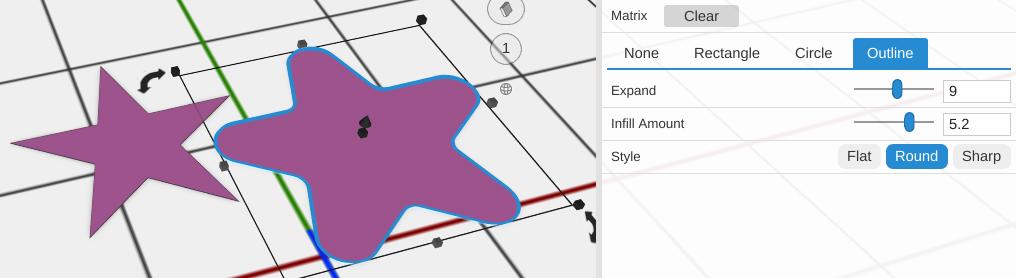
Border Path makes a flat base shape around a 2D path: by default a rounded rectangle 3 mm bigger than the path on every side. Extrude it to make a plate, a tag or a backing for raised text. In the Design tree it is named Border.
How to Use
- Select a 2D path
- Click Border Path in the Path group of the toolbar
- Pick a Base Type and set Expand
Parameters
- Base Type - The shape of the border, as tabs:
- None - No border is made (the panel says so)
- Rectangle (default) - The rectangle around the path’s bounds, grown by Expand, with rounded corners
- Circle - A circle around the path (see Centering), grown by Expand
- Outline - The path’s own outline, grown by Expand
- Expand - How far the border reaches past the path, in mm (default 3; the slider runs 0 to 30). Not shown for None
- Infill Amount - Outline only. Fills in notches and gaps in the outline so the border’s edge is smoother, in mm (default 3; 0 to 10). The bigger the amount, the wider the gaps it bridges; 0 just grows the outline by Expand
- Style - Outline only. How the grown outline’s corners are drawn: Flat, Round (default) or Sharp
- Centering - Circle only. Bounds uses the smallest circle that encloses the path. Weighted (default) centers the circle on the weighted center of the path’s outer outlines and reaches out to its farthest point, so its circle is usually bigger
- Radius - Rectangle only. The corner radius, in mm (default 3; the slider runs 0 to 20)
- Segments - Rectangle only. How many straight pieces make each rounded corner (default 9; 1 to 30)
Tips
- Set Radius to 0 for a square-cornered rectangle
- Duplicate the path first, then Subtract the copy from the border to make a frame shape
- To grow the path itself without a separate base shape, use Inflate Path
Related
- Inflate Path - Expand a path outward
- Outline Path - Create an outline from a filled path
- Linear Extrude - Give the bordered path height