SVG Object
An SVG (Scalable Vector Graphics) file opens as an SVG Import. By default it makes one solid part per painted shape of the drawing, each 5 mm tall, with shapes painted on top cut out of the shapes under them, so the parts fit together like the drawing. Switch Output to 2D to get the shapes as flat paths instead, ready for Linear Extrude, Revolve or the other path operations.
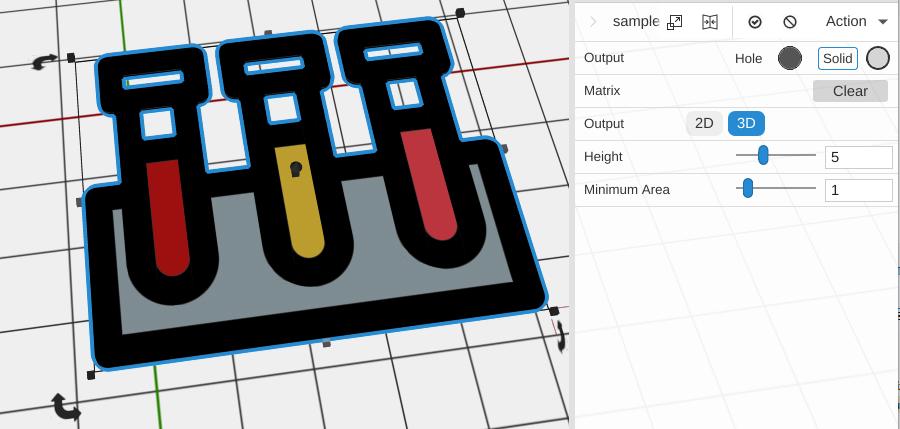
How to Use
- Drag an .svg file onto the 3D view, use Add System File to Bed under Add to Bed, or add one from a library folder
- Set the Height, or switch Output to 2D to work with the flat shapes
- In 2D, apply Linear Extrude to give it height, or use other Path Operations
Parameters
- Output - 3D (default) makes a solid part per shape; 2D makes flat paths
- Height - How tall the solid parts are, in mm (default 5; the slider runs 1 to 40). Shown only for 3D output
- Minimum Area - Shapes smaller than this, in square mm, are left out of the solid parts (default 1; the slider runs 0 to 100). Raise it to drop specks and stray dots
Tips
- SVG files should contain filled shapes or closed paths for best results
- Complex SVGs with many paths may take longer to process
- Use Select Paths to work with specific parts of a multi-path SVG
- Many free SVG files are available online for logos, icons, and decorative patterns
Related
- Image to Path - Convert raster images to paths instead of using SVG
- Text - Create text directly without needing an SVG
- Linear Extrude - Give flat paths height
- 2D Paths - Built-in path primitives