Text
Text makes raised 3D letters from words you type, in one of MatterCAD’s fonts. Use it for labels, signs, nameplates and decorative lettering. Text 2D in the 2D Primitives is the same object with its Output set to 2D: flat letter outlines you can extrude, offset or cut with the path operations.
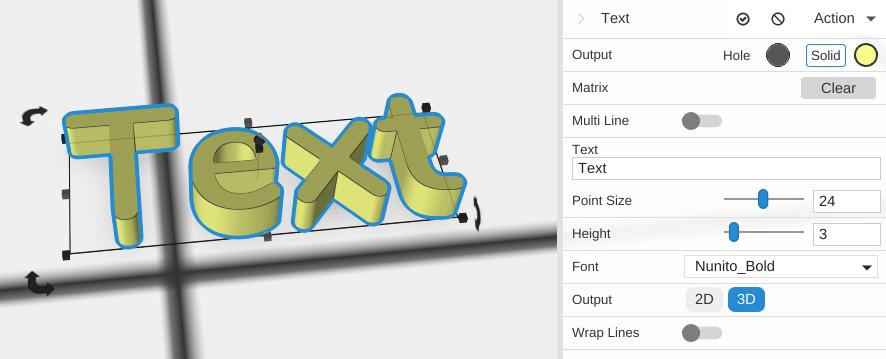
How to Use
- Add Text from the 3D Primitives folder, or double-click it in the favorites bar
- Type your words in the Text box in the Properties panel
- Pick a Font and set the Point Size and Height
Parameters
- Plane - The construction plane the text is drawn on (default XY, flat on the bed)
- Multi Line - Off by default. Turn it on to type several lines: the one-line Text box is replaced by a larger Text box, and Alignment appears
- Alignment - Left (default), Center or Right: how the lines line up with each other. Shown only with Multi Line on
- Text - The words to write (default “Text”)
- Point Size - The letter size in points (default 24; the slider runs 1 to 48)
- Height - How tall the letters stand, in mm (default 3). Shown only for 3D output
- Font - The typeface (default Nunito Bold), chosen from the fonts that come with MatterCAD
- Output - 3D (default) makes solid letters; 2D makes flat letter outlines
- Wrap Lines - Off by default. Turn it on to break long lines at the Wrapping Width
- Wrapping Width - The width, in mm, at which lines wrap (default 200). Shown only with Wrap Lines on
- Wrapping Indent - How many spaces to add at the start of each wrapped line (default 0), useful for bullet points. Shown only with Multi Line and Wrap Lines on
Tips
- Use Subtract to engrave text into a surface instead of raising it
- Switch Output to 2D to give the letters a bevel or an outline with the path operations, then extrude them yourself
Related
- Braille - Generate raised Braille text
- QR Code - Generate a QR code as a 3D object
- Image Object - Place a picture in your design as the input for the image operations