Tube
A hollow cylinder with its own inner and outer diameters and a height: a pipe, washer or spacer. Add it as Tube from the 3D Primitives. (The Ring in the 2D Primitives is the flat version, a Ring Path.)
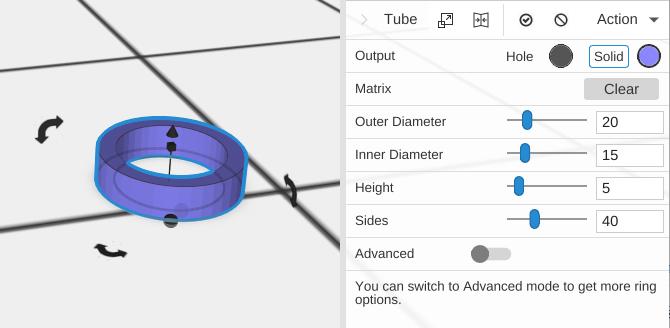
Parameters
- Outer Diameter - The outside width of the tube, in mm (default 20)
- Inner Diameter - The width of the hole through the middle, in mm (default 15). It always stays a little smaller than the Outer Diameter
- Height - How tall the tube is, in mm (default 5)
- Sides - Number of segments around the perimeter (default 40; 3 to 360)
- Advanced - Off by default. Turn it on for the options below
Advanced Parameters
- Starting Angle - Where the tube begins around its axis, in degrees (default 0)
- Ending Angle - Where the tube ends, in degrees (default 360). Less than 360 leaves a gap, like a C-clip
- Round - Shapes the top of the wall: None (default) keeps it flat, Up slopes it down across the wall in an outward-bulging curve, Down in an inward-curving one
- Direction - Which edge the rounded top slopes down to: Inner or Outer (default). Shown only with Round set to Up or Down
- Round Segments - How many steps make the rounded top (default 15; 2 to 90). More is smoother. Shown only with Round set to Up or Down
Tips
- The wall thickness equals (Outer Diameter - Inner Diameter) / 2
- Use this for washers, spacers, bushings, and pipe-like features
- Set the height tall for pipes or short for flat washers
- Use Starting and Ending Angles for partial shapes like C-clips