Curve
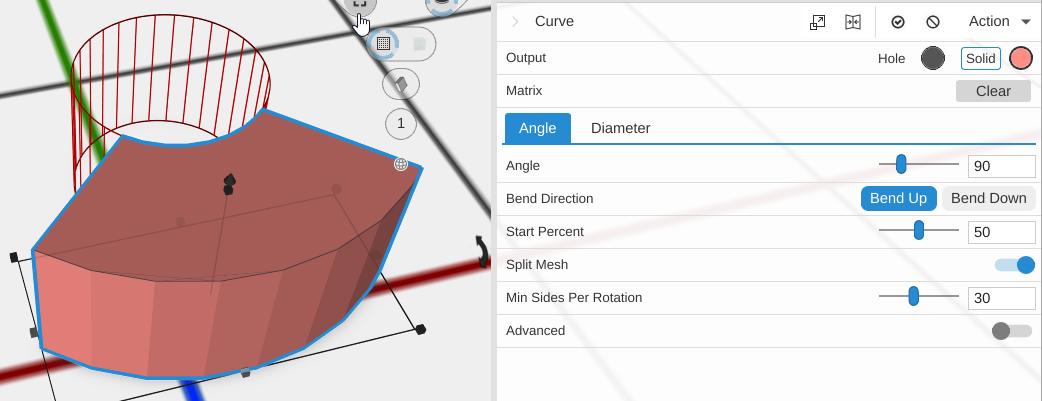
Curve bends a straight object into an arc or circular shape. You can control the bend by specifying either an angle or a diameter to wrap around.
How to Use
- Select an object
- Click Curve in the Deform group of the toolbar
- Choose between Angle or Diameter bend type
- Adjust the parameters to get the desired curvature
Parameters
- Bend Type - How you set the bend, as tabs:
- Angle (default) - Bend the part by an angle
- Diameter - Bend the part around a circle of a chosen diameter
- Diameter - The size of the circle the bend wraps around, measured across it, in mm (the slider runs 1 to 400). Shown with Bend Type Diameter
- Angle - How far the part turns, in degrees (default 90; 1 to 360). Shown with Bend Type Angle. Angle and Diameter describe the same bend: set one and the other follows
- Bend Direction - Bend Up (default) or Bend Down: which way the ends curl, around the Z axis
- Start Percent - Where the bend is centered along the part’s length, as a percent from the left side (default 50)
- Split Mesh - On by default. Cuts the part into strips across its length first, so it has enough detail to bend smoothly
- Min Sides Per Rotation - The fewest strips per full turn of the bend (default 30; the slider runs 3 to 360). More is smoother. Shown only with Split Mesh on
- Advanced - Off by default. Turn it on to bend only part of the length
Advanced Parameters
- Start Bend Percent - Where the bent stretch begins, as a percent of the length from the left (default 0)
- End Bend Percent - Where the bent stretch ends, as a percent of the length from the left (default 100)
In Advanced mode only the stretch between these two bends, turning by the Angle; the straight parts on either side stay straight and follow the ends of the bend.
Tips
- Use Curve to create arches, rings, and bent brackets from straight stock shapes
- Setting the angle to 360 wraps the object into a complete ring
- Increase Min Sides Per Rotation for smoother results on tight bends
- The object is bent along its length (X axis)