Primitives
MatterCAD’s 3D primitive shapes are the building blocks for your designs. Add one from the 3D Primitives folder (in the Library, or under Add to Bed), or from the favorites bar down the left side of the design, then change its settings in the Properties panel to get the exact shape you need.
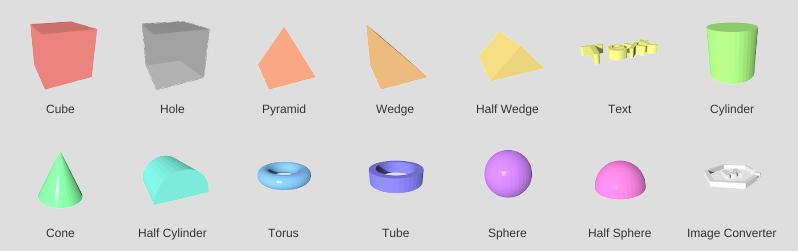
3D Primitives
In the order the 3D Primitives folder lists them:
- Cube - A box shape with adjustable width, depth, height, and optional rounding
- Hole - A cube that cuts away whatever it overlaps when combined
- Pyramid - A four-sided pyramid with adjustable base and height
- Wedge - A triangular prism shape, a ramp
- Half Wedge - A ridge with two sloped sides
- Text - 3D lettering in MatterCAD’s fonts
- Cylinder - A round column with configurable diameter, height, and sides
- Cone - A tapered cylinder that comes to a point
- Half Cylinder - A cylinder cut in half lengthwise
- Torus - A donut shape with inner and outer diameter control
- Tube - A hollow cylinder with inner and outer diameters
- Sphere - A round ball with adjustable diameter and detail level
- Half Sphere - The top half of a sphere
- Image Converter - Turn a picture into a solid shape
- 3D Curve - A curve through points in space, for Sweep and other operations
Other Shapes
These come from other places:
- Braille and Braille Card - Raised Braille, from Included > Design Apps
- QR Code - A QR code picture plate, from Included > Tools
- Image Object - A picture you drop on the 3D view, the input for the image operations
- SVG Object - What an .svg file opens as: solid parts or flat paths