Variable Sheet
The Variable Sheet stores shared values for a design. Use it when several objects should reference the same dimensions, counts, labels, or formulas. Changing a value in the sheet recalculates the dependent objects, so parametric designs stay consistent without editing every object one at a time.
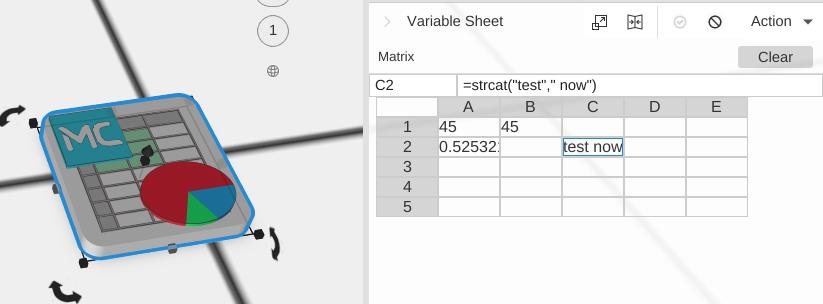
This page covers what a sheet is for and how its values are written and read. For the mechanics of the editor itself - adding and removing rows and columns, column widths and row heights, cell formatting and CSV - see Editing a Variable Sheet.
How to Add a Variable Sheet
- Open the library and add Variable Sheet to the scene.
- Select the Variable Sheet object to show the sheet editor.
- Select a cell, then enter a Name and a value or formula.
- Use the cell name from other expression-enabled fields in the design.
Objects use the nearest sheet above them in the scene tree, so a sheet dropped inside a group serves that group only. A sheet at the top level serves the whole design.
The Sheet Editor
The editor appears in the properties panel when the sheet is selected.
- The menu bar - File, Edit, Insert, Format and Help. See Editing a Variable Sheet for what each one does.
- The edit row - the Name box on the left and the formula box beside it, both acting on whichever cell is selected. At the far right is a button that pops the editor out into a window of its own, which is worth doing for anything bigger than a handful of rows.
- The units line - a reminder that the sheet’s numbers are millimetres: Values are in millimeters. Write a unit for inches, e.g. =2in.
- The grid - column letters across the top, row numbers down the side, and
+buttons at the right and bottom edges for adding a column or a row. Right-click a column letter or a row number for the menu of commands that act on that column or row.
Click a cell to select it, then type into the formula box to change what it holds. You can also type straight into the selected cell in the grid, and move between cells with the arrow keys.
Entering Values
Each cell holds one expression, which is whatever you typed into it:
- A number -
12,0.5,-3. Sheet numbers are millimetres. - Text - anything that is not a number and does not start with
=. It is shown exactly as you typed it, quote characters and all. - A formula - anything starting with
=. It is evaluated, and the cell shows the result.
A formula that produces text shows that text without the quotes the expression language carries it in, so =strcat("MC-", A2) shows MC-MMQFQZ5S rather than "MC-MMQFQZ5S". A cell you typed "hello" into is not a formula, so it shows "hello" - the quotes are part of what you typed.
Naming Cells
A cell can be given a name in the Name box, and that name is how the rest of the design should refer to it. =wall_thickness says what it means where =B2 does not, and a name keeps working when rows and columns are inserted above or beside the cell.
To name a cell, select it, type the name into the Name box and press Enter. To take a name off a cell, clear the box.
Names look after themselves in two ways:
- A name travels with its cell. Insert a row above a named cell and the name moves down with it - it belongs to the cell, not to the address.
- Renaming rewrites every reference. Change a cell’s name and every
=oldnamein the sheet and everywhere in the design is rewritten to the new name, as a single Undo step.
Clearing a name rewrites too, but to #REF! rather than to a new name: the name no longer exists, so every formula that read it says so. That is deliberate - a reference to a name that has gone breaks visibly instead of quietly evaluating to zero.
The One Thing a Rename Cannot Rewrite
A name written inside quotes - the column argument index() and xlookup() take - is read as a cell name while the formula is being evaluated, so nothing rewrites it: quoted names are left exactly as you typed them, because a quoted string may be text that has nothing to do with any cell.
So the rename happens, and MatterCAD then shows a message listing every formula that still quotes the old name - in the sheet and in the objects that read it - naming where each one is, so you can go and retype them. Rename price to cost and =index("price", 2) is one of the lines you get back.
A rename that only changes letter case - price to Price - says nothing, because a quoted name is matched regardless of case and every one of those formulas still finds the cell.
What a Name Can Be
Names are not case sensitive, and a name is refused - with a message saying why - rather than being quietly changed into something else:
- Letters, digits and underscores, starting with a letter or an underscore. Spaces are turned into underscores for you, so
wall thicknessbecomeswall_thickness. - Not an address inside the sheet.
b2already names the cell in column B, row 2, so it cannot also be a name. An address beyond the sheet -Z99on a 5x5 sheet - is allowed, because nothing reads it as an address today; grow the sheet to include that cell and every=Z99starts reading the cell instead of your named one. - Not a column of the sheet. On a 5 column sheet
AthroughEare refused, becauseindex()andxlookup()read a quoted column as a cell NAME first - a cell namedBwould take the spelling"B"away from column B. Letters past the right edge are fine:Fandskuare ordinary names on that sheet - but the same caveat applies as for an address beyond the sheet: add columns until the sheet reachesFandindex("F", 2)starts reading that column instead of your named cell. - Not a built-in constant or unit.
pi,tau,e,mm,cm,m,in,inch,ft,trueandfalsealready mean something in a formula. - Not a name another cell already has. Two cells sharing a name would leave every formula reading whichever one happened to be resolved first.
Formulas
Start a formula with = to evaluate it in the sheet:
=20 + 5returns25=pi * 10returns31.415926535897931=A1 * 2references another cell by address=wall_thickness + 4references a named cell=2.5inreturns63.5, and=5inreturns127- the unit is converted to millimetres
A unit suffix is read by the expression parser, so it only counts inside a formula. A cell holding 5in on its own is never evaluated and stays the text 5in; write =5in to get 127. That is what the editor’s own hint means by Write a unit for inches, e.g. =2in. See Expressions for the units available.
The sheet supports arithmetic, parentheses, comparisons, the constants pi, tau and e, the bracketed unit constants [cm], [m], [inch] and [ft], and the whole function library. See Expressions for the syntax and Expression Functions for the functions.
A cell whose formula references something that does not exist - a misspelled name, a cell past the end of the sheet, or a loop of cells depending on each other - shows 0 rather than a made-up value. A reference the sheet knows is broken, because the cell it named was removed or its name was cleared, is rewritten to #REF! so the damage is visible in the formula itself.
Using Sheet Values in Objects
Most numeric fields in MatterCAD support expressions. To use a sheet value in an object parameter, prefix the reference with =:
- Set a Cube Width to
=case_width. - Set an Array Count to
=hole_count. - Set a Translate Translation value to
=wall_thickness * 2.
When the sheet changes, MatterCAD recalculates the objects that depend on it - and only those objects, so a big design stays responsive.
An expression can also read a value straight off another object rather than out of a sheet - =Handle.Sides, or =self.Depth for the object’s own settings. See Object References.
When a Size Changes
When a shape’s size changes - from a sheet or by typing a new value - it keeps its bottom where it was and stays centered in X and Y. A taller cube grows upward from the same floor; a wider one grows out evenly on both sides.
So to place parts that follow a sheet, measure from the bottom, not the middle:
- Put each part on the bed, centered at X 0, Y 0. If you rotate one, set it back down on the bed afterward - rotation turns a part about its center, which can push it below the bed.
- Wrap it in a Translate and give the Translation formulas: X and Y say where the part’s center goes, Z says how high its bottom sits.
For example, with sheet cells T (thickness), H (post height) and L (arm length):
- Post - a Cube with Width
=T, Depth=T, Height=H. It stays on the bed; no Translate needed. - Arm - a Cube with Width
=L, Depth=T, Height=T, then a Translate with Translation=[L/2 - T/2, 0, H]. Its bottom rests on top of the post, flush with the post’s left side, and it reaches out to the right.
Change H and the arm rides up with the post’s top. Change T and both parts thicken without the arm sinking into the post, because every position was measured from a bottom that the resize does not move.
Text and Data
Variable Sheet cells can hold text as well as numbers. Text values are useful for generated labels, part numbers, imported data, and custom design apps.
Functions worth knowing about here:
strcat()orconcat()- Join text or values together.substring()- Extract part of a text value.split()- Split text and return one item.count()- Count delimited items in text.substitute()- Replace text.rand(seed)- Generate a deterministic random value when a seed is supplied.importdata()- Read a URL or a local file.index()- Read a cell whose row is calculated, which is how an arrayed copy reads its own row.xlookup()- Find the row that holds a value and return another column from it.
Each is described with an example in Expression Functions.
Driving an Array from a Table
Put a table in the sheet - part numbers down column A, say, with a header in row 1 - and give an object inside an Array an expression that reads a row per copy:
=index("A", [index]+2)
[index] is the copy’s position counting from 0, so the first copy reads A2, the second A3, and so on down the table past the header. Set the Array’s Count to =count(...) or to a cell holding the number of rows and the run resizes with the data.
Tips
- Prefer descriptive names over cell addresses for values used by other objects.
- Keep core dimensions near the top-left of the sheet so they are easy to find.
- Use formulas for derived values, such as
inner_diameter = outer_diameter - wall_thickness * 2. - If a formula cannot be parsed, MatterCAD keeps the original input as text.
- Pop the editor out into its own window before working on a large sheet.
Related
- Editing a Variable Sheet - Rows and columns, column widths and row heights, cell formats and CSV
- Expressions - Expression syntax, cell references and bracket tokens
- Expression Functions - Every function, with examples
- Object References - Read a value off another object instead of a cell
- Components - Create reusable parameterized designs
- Array - Create repeated patterns driven by sheet values