Select Child
Select Child picks one child from a group of objects based on either an index number or a name. This is especially useful in scripted and parametric designs where you want to dynamically choose which object to display.
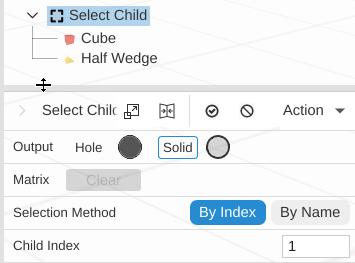
How to Use
- Select two or more objects
- Click Select Child in the Duplication group of the toolbar
- Choose By Index or By Name to control how the child is selected
- Set the index number or name to match
Parameters
- Selection Method - By Index (default, select by position) or By Name (select by object name)
- Child Index - The position of the child to select, counting from 0 (default 0; shown with By Index). Supports expressions
- Child Name - The name of the child to select (shown with By Name). Supports expressions
An index below 0 picks the first child, and an index past the end picks the last child. A name that matches no child picks the first child. If there are no children, nothing is shown.
Use in Scripting
Select Child is designed to work with expressions and the rand() function to create dynamic, data-driven designs. rand(seed) gives a number from 0 up to (but not including) 1, so multiply it by the number of children and round down to get an index: with 5 children, =floor(rand(42) * 5) picks one of them, the same one every time for seed 42. Always wrap it this way: Child Index rounds to the nearest whole number, so a bare rand(seed) only ever picks the first or second child.
Example: Random book props for a stage show
- Import 5 different book meshes as children of a Select Child operation
- Set the Selection Method to By Index
- Use an expression for Child Index, such as
floor(rand(seed) * 5)whereseedis a sheet variable - Duplicate the Select Child operation multiple times, each with a different seed value
- Each instance randomly picks a different book from the set
This pattern works for any scenario where you need to pick from a set of variants: furniture, decorations, architectural elements, or any collection of interchangeable parts.
Tips
- Combine with Array to create varied patterns where each copy selects a different child
- Use sheet variables for the index or name to drive selection from a spreadsheet
- Because an index out of range picks the first or last child, and an unknown name picks the first, your design never breaks even if the index or name is wrong
Related
- Array - Duplicate objects in linear, radial and transform patterns